
The Needs Attention view helps clubs monitor failed card payments and see exactly where each payment is in the retry process.
This makes it easy to understand which payments are still being retried automatically and which subscriptions have stopped and require action.
You can find Needs Attention in the Finance section of your admin panel.

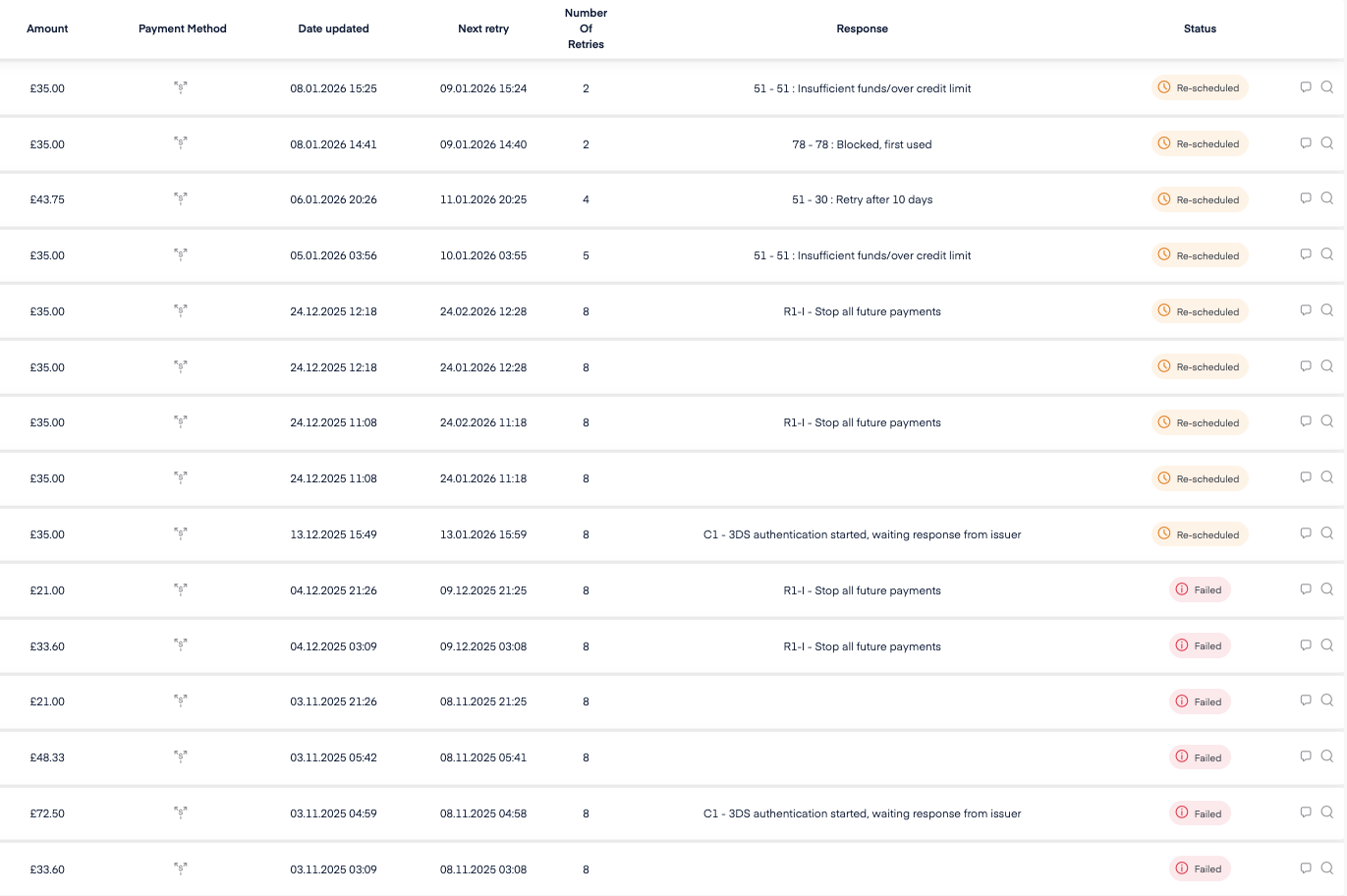
What does Needs Attention show?
In this view you can see:
Failed and retried card payments
The retry phase for each payment
Whether a payment will be retried automatically or has fully failed
Payment statuses explained
Re-scheduled means the payment is still in the automatic retry phase.
Abler will continue retrying the payment on your behalf
No action is needed yet
You can monitor the Next retry date to see when the next attempt will happen
Failed
Failed means the payment has stopped retrying.
The subscription has stopped
The payment will not be retried automatically
Action is required by the club
At this stage you should contact the parent/member and arrange payment or update card details.
Why use Needs Attention?
Using Needs Attention helps you:
Quickly spot stopped subscriptions
Monitor automatic retries
Reduce missed payments
Keep your club’s finances up to date